Tập hợp các thao tác trên bảng lệnh Layer trên Gimp


|
|
Create a Layer and Add Your Object
- Create new - Chọn 1 trong các cách sau
- Layer > New layer ⇧ ⌘ n
- Trong layer panel - Click icon
 góc trái, cạnh dưới.
- Open image as a layer
- Tách layer ra thành 1 file xcf riêng - ⌘ c - ⌘ ⇧ v
 góc trái, cạnh dưới

Modify
- Duplicate - ⌘ ⇧ d
- Arrange
- Opacity Layer
- Tăng giảm Opacity Layer -
- trong Unified Transform tool, ⌥ scroll
Selection
- Click layer nào là chọn layer đó. Chọn nhiều layer nhấn Shift click
- Di chuyển nhiều Layer: chọn nhiều layer, nhấn shift drag obj trên canvas.
- Select layer content - ⌥ click vào thumbnail layer
- Tách vùng chọn ra 1 layer
- Cách 1
- ⌘ c vùng chọn
- Edit > Paste as > New layer (có thể gán phím tắc)
- Cách 2
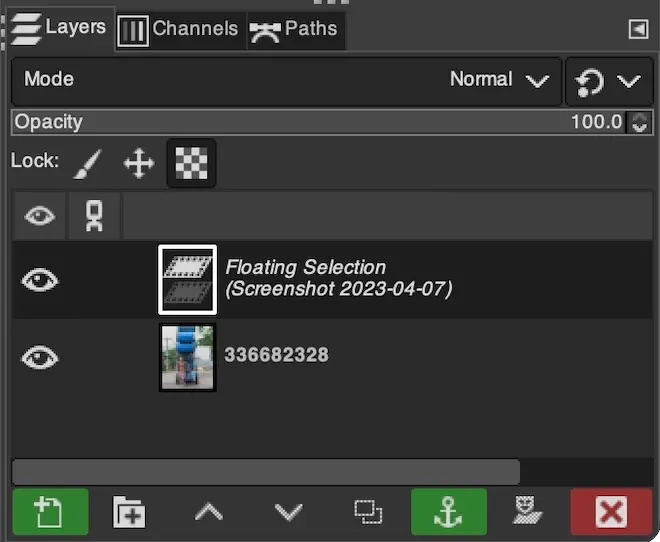
- ⌘ c - ⌘ v vùng chọn (xuất hiện floating selection
 )
- Nhấn New Layer màu xanh cạnh dưới bảng lệnh
- ⌘ c - ⌘ v vùng chọn (xuất hiện floating selection
- Cách 1
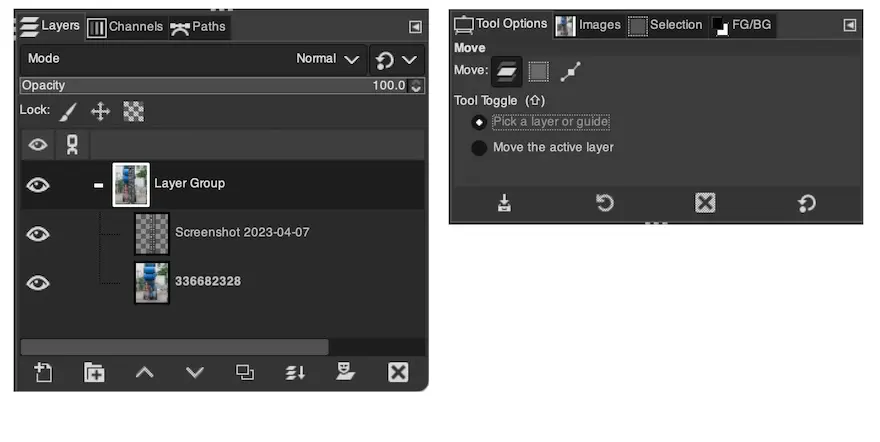
Group layer và move 1 group
Để move 1 group layer  , thay vì cứ drag layer nào thì layer đó di chuyển
Trong Tools option, chọn move the active layer


Comments
No comments
There are no comments yet. Be the first to write one.